
Well, as I usually do (or rather, at least, did last year) – I installed the new public betas of the next release of iOS, macOS and watchOS on my main Apple devices. I was curious to try the new and improved Siri, along with an updated macOS which many on the developer betas claimed was much faster than the current (but soon-to-be-previous) release.
iOS 27 and macOS 27 (Golden Gate) installed just fine. No issues at all. But watchOS 27 was a mess. It took over two hours to download and install, and when it did install, it was stuck on the Apple logo for a considerable amount of time, and the watch was getting very hot on the charger. So I took it off, and tried to force-restart it. Whether that worked or not, I don’t know, but it did recover and confirmed it had updated to watchOS 27.
ALAS!
The watch didn’t tell the iPhone it had been updated, and it seemed to be permanently stuck on “Installing” and kept referring to watchOS 26.5. I tried a number of things: rebooting the phone. Rebooting the watch (which was slow). I was going to reset the watch completely and started the process – but that got stuck too. Got an email from Apple’s Find My service that the watch was now unavailable to track if lost. Gulp
But the iPhone was insistent that the watch was still in install mode. Then I read some notes which told me to turn off Bluetooth on the phone and then turn it back on. That did the trick. The iPhone immediately recognised the updated watch and everything was working. Sort of. I had to check the watch was still available in my iCloud account (it was – and findable via Find My) – so all good there. But there are issues that apparently appeared in developer beta 3 and have survived into this public beta, where watch complications are missing. So I don’t have a fully functional Apple Watch Ultra 3 right now. That’s beta testing for you! But I know Apple will get around to squishing these bugs, and half the fun is in finding them and reporting them…
… which I had to do with macOS Golden Gate. Eager to get the new Siri running, I signed up for the waiting list on iOS as soon as I could. Got the service enabled minutes after doing so. Initial tests seemed to be okay, so I tried the same on macOS 27.
ALAS!
Switching on Siri on the Mac requires you to say a few phrases. For me, the first phrase was simple, but a bit of a tongue-twister, and eventually Siri kept telling me to try again. It could not hear me. I checked my Yeti microphone input levels. Tried different microphones, including the Mac’s, and it was still unable to hear me. I can’t activate Siri on the Mac until I go through this process. Didn’t have to do that on iOS 27, and Siri wasn’t enabled previously.
It also took a while for the Siri app to work on macOS – it did bugger all until the optimising stage on the iPhone got to a point where Siri could work. Or at least, that’s how it felt. Maybe it was just the language model being downloaded in the background – I don’t know; there’s no status bar like there was with Apple Intelligence in previous versions of the operating systems.
When Siri did kick in properly, it was better in many ways, but considerably worse in others. For example, it knows where I live when I ask it. But when I asked where the nearest bus stop to get me into Woking was, it gave me Woking station itself. When I said it was wrong, it directed me to Guildford’s Friary station – six miles the other way from home.
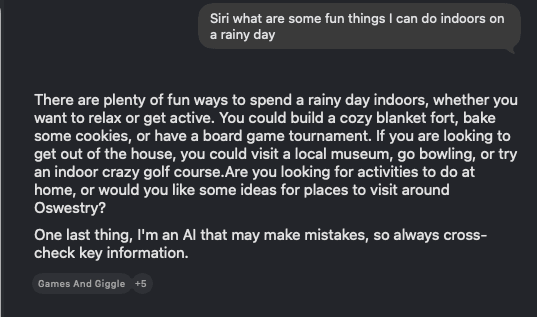
When I was trying and failing to set up Siri on the Mac, the iPhone’s Siri always, always kept interrupting, and its answer to one of the set-up questions (Siri, what are some fun things to do indoors on a rainy day?) was some fun things to do in Oswestry, Shropshire. Very random.
I did have a crack at a few other new AI-related features, including reframing photos and extended photos. Similarly for Image Playground. They’re okay, but nothing to write home about. These are tools I can’t see myself using much – if at all. The Ministry of Misinformation hasn’t got much to be concerned about. But a definite improvement over the previous generation. Apple’s work with Google has certainly helped.
What I did find good, however, is that macOS Golden Gate is bloody fast. It feels much nippier than Tahoe in many ways – and especially Apple TV. Before, it would take forever to load, and then if I wanted to browse my movie or TV library, it’d take even longer to return the results. Here, it returns the results instantaneously and with full artwork (some of which went missing in Tahoe).
There are a few bugs here and there (launching Terminal from the Dock sometimes requires me to click twice for some reason), and I thoroughly dislike the Ask Siri option being at the top of the contextual menu when you right-click on something. All that does is bring up a black bar which does nothing, with no obvious way of closing it (you have to focus on it and issue the application close command – Cmd-Q).
The non-AI/non-Siri parts of iOS 27 are okay, too. No real issues there (as yet). All in all, it’s promising. But Siri still needs a bit of a kick up the arse – especially when it comes to British geography – and I also note that Siri cannot access my emails through Gmail (via the Gmail app), so either Apple or Google (or both) will need to work on that. The power that Siri could wield when it’s connected to supporting apps is promising. But I do not intend to use Apple Mail for my email, unfortunately.